What is tool use (function calling) in LLMs, and how does it enable agents?
Tool use (function calling) in LLMs explains how models call external functions and APIs to extend capabilities, and how that mechanism enables agents to act, fetch, and compute reliably. This question covers the mechanics, a concrete example, design patterns, and common tradeoffs when you build tool-enabled agents.
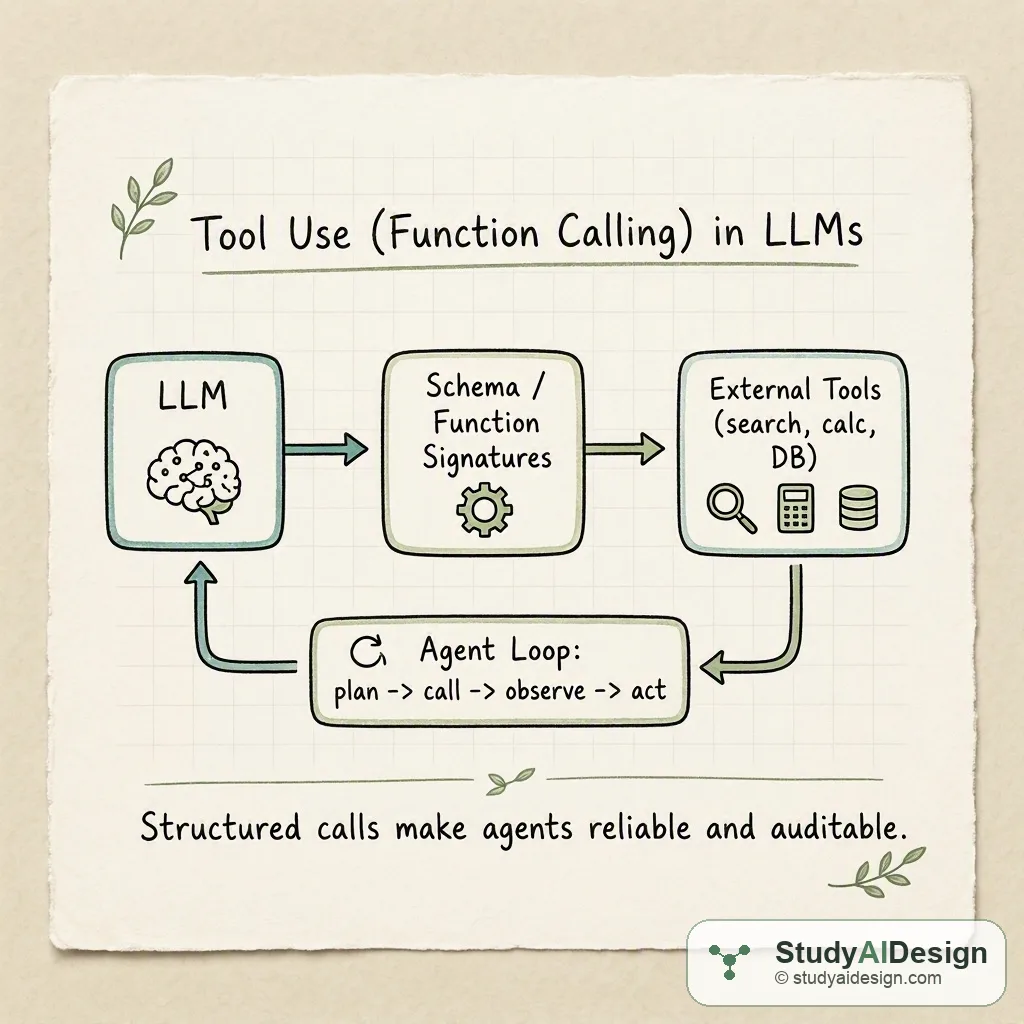
TL;DR
- Tool use (function calling) lets an LLM produce structured outputs that map directly to API or function calls so agents can act beyond text.
- The model emits a function name and arguments that match a provided schema, the system invokes the function, and the result feeds back to the model.
- This enables reliable access to search, calculators, databases, and other services while keeping prompts small and responses parsable. Key tradeoffs: low-latency correctness versus complexity of schema design and error handling.
In this question, we will learn what tool use or function calling means for LLMs and why it matters for building agents that perform tasks. We will keep the focus practical, with one concrete example so you can explain it in an interview.
We will cover the following:
- The direct answer
- The intuition
- How it actually works with a worked example
- Design patterns for agents and tools
- Tradeoffs and failure modes
Direct answer: Tool use is the pattern where an LLM is prompted with function schemas and emits structured function calls that a runtime executes, enabling agents to access external capabilities like search, computation, and actions. This lets models delegate precise, auditable work to tools and then reason about the returned observations. The model still guides behavior, but the heavy lifting is done by reliable services mapped via clear schemas.
The intuition (an analogy that makes it click)
Think of the LLM as a well spoken assistant who knows what you want but cannot fetch a live price or run a calculator. Function calling gives the assistant a phonebook of services and the exact form of the phone number to dial. The assistant writes a structured request, the runtime dials the number, and then reads back the answer. You keep the human level planning and the tools do the concrete facts and side effects.
How it actually works (the real mechanics, with one concrete worked example)
At runtime you provide the model with a prompt and a list of function signatures or JSON schemas. The model returns either plain text or a structure like {
"name": "get_stock_price",
"arguments": {"symbol": "TSLA"}
}. The system matches by name, calls the corresponding function, and appends the result to the model context so it can continue reasoning.
Worked example: build a small agent that answers "What is TSLA latest price and the 10 day moving average?"
- Register two functions: get_stock_price(symbol) and get_historical_prices(symbol, days).
- Prompt the model with behavior and the two schemas.
- Model returns a call to get_historical_prices for 10 days. System executes and returns prices .
- Model computes the moving average and returns a final message.
The moving average formula you can show is the display math:
A simple data table of returned prices might look like this:
| Day | Price |
|---|---|
| 10 | 210.12 |
| 9 | 212.05 |
| 8 | 208.74 |
| 7 | 215.10 |
| 6 | 213.50 |
| 5 | 211.00 |
| 4 | 209.80 |
| 3 | 214.20 |
| 2 | 216.00 |
| 1 (latest) | 217.35 |
The model receives that array and applies the formula to compute the number and then formats a user-facing answer. The schema ensures the runtime knows how to parse arguments and map the call to the correct function.
Design patterns for agents and tools
-
Planner and executor: split the agent into a planning model that decides which tool to call and an executor that performs the call and returns observations. This separation keeps prompts smaller and responsibilities clear.
-
Structured schema design: make function signatures narrow and explicit. For example, prefer parameters like "symbol" and "days" over a single free text blob. Narrow schemas reduce parsing errors and improve safety.
-
Observe and replan loop: after a tool returns, feed the result into the model so it can revise its plan. This loop forms the core agent cycle: plan, call, observe, act.
Comparison of output types
| Output style | When to use | Reliability |
|---|---|---|
| Free text only | Simple QA, no side effects | Low for parsing and automation |
| Structured function calls | Calling APIs, producing exact arguments | High when schemas are well designed |
| Action logs with human review | Risky side effects | Medium, adds human safety |
Safety, validation, and robustness
Always validate tool inputs and outputs outside the model. Treat model outputs as instructions that need sanitizing. For example, if the model suggests calling a destructive API like delete_user, require an authorization step and strict schema checks. Use retries and timeouts for network tools and handle malformed or missing fields gracefully.
Tradeoffs and failure modes
Tool use raises new tradeoffs: you get stronger correctness for actions but you must manage schema design, error handling, and increased system complexity. Latency also grows because each function call may add round trips.
Questions the interviewer might ask
Some follow-up questions you might get:
How do you prevent a model from calling harmful APIs? Design the runtime to whitelist functions per session and to validate arguments. Also separate high risk functions behind additional human or authorization checks.
What happens when the model returns malformed JSON or wrong argument types? Your runtime should detect parsing errors and return a structured error object to the model so it can retry or choose a different plan. Do not execute anything that fails schema validation.
When should you prefer a single monolithic tool versus many small tools? Many small tools are easier to secure and test. Monolithic tools can reduce round trips but increase blast radius. Prefer small focused APIs when safety and auditability matter.
How do you keep the agent from overusing tools and incurring cost? Add budget constraints in the planner prompt and track call counts. Implement caching and require the model to check cache first for repeated queries.
Can you compose tools, for example chain search then database update? Yes. The agent can call tool A, observe the result, then call tool B using data from A. Keep each step explicit in the context so the model can reason about preconditions and effects.
Some things to note:
- Instrument everything: logs are essential for debugging and safety.
- Keep schemas narrow and versioned so you can evolve tools without breaking agents.
What the interviewer is really testing
They want to know you understand the separation between language reasoning and external execution, and that you can design a reliable, auditable integration. They also want to hear about practical safety checks, schema design, and failure handling rather than a purely conceptual description.
Further reading in the curriculum
Go deeper on the fundamentals behind this question.
- Prompting and Context Engineering How to structure prompts and fill the context window so models produce reliable, grounded, and cost-efficient outputs.
- Agent Fundamentals From single LLM calls to autonomous agents: planning, tool use, memory, and the control loop.
- AI Design Patterns A catalog of recurring architectural patterns for LLM systems, with tradeoffs, failure modes, and guidance on when to combine or avoid each.
Related questions
How would you rate the quality of this article?
Prepare for your AI engineering interview
This is one of many detailed questions and explainers on StudyAIDesign. Browse the full set, work through the curriculum, and walk into your interview ready.