How do you design and define tools for an AI agent?
How do you design and define tools for an AI agent? This question asks how to specify tool capabilities, inputs and outputs, failure modes, and runtime controls for agents that call external tools. You will outline interfaces, safety checks, cost and latency considerations, and examples of tool contracts.
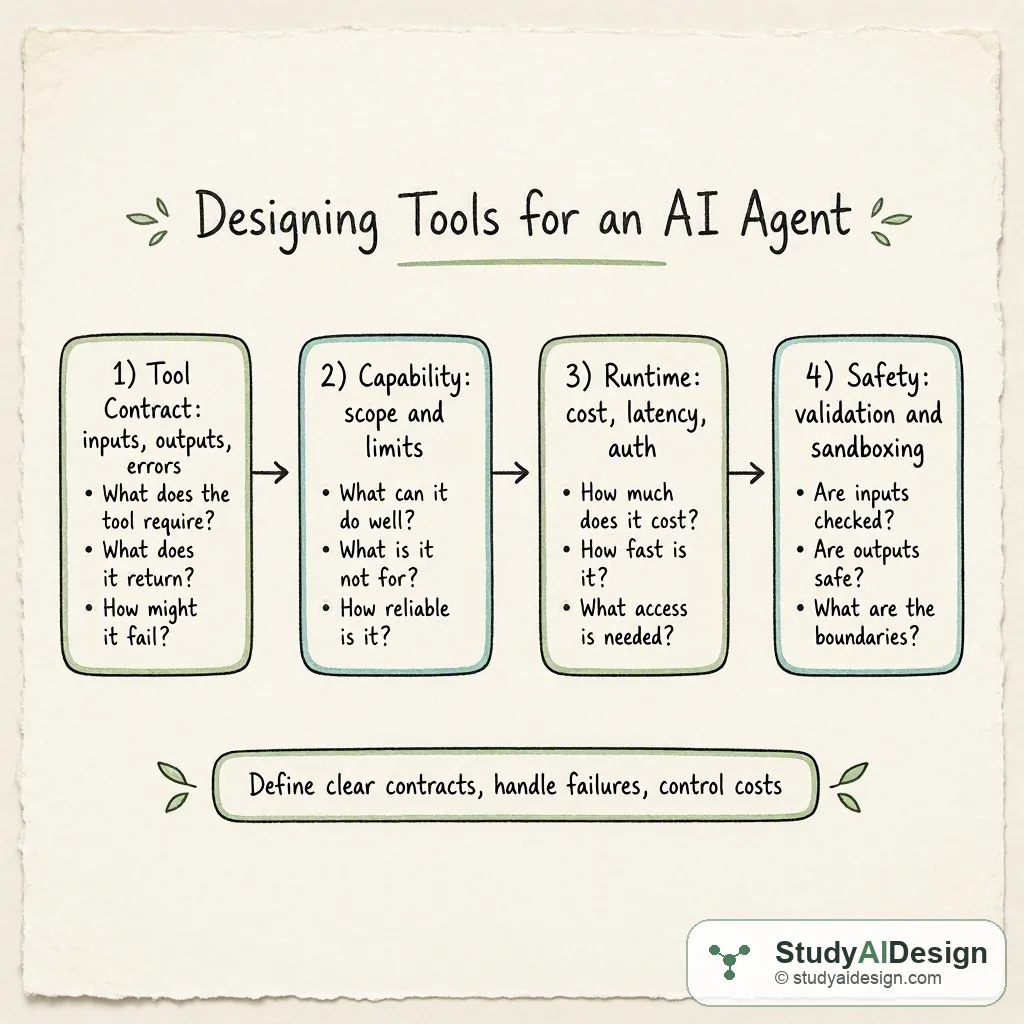
TL;DR
- Define each tool as a clear contract: inputs, outputs, preconditions, and explicit failure modes.
- Balance capability, cost, and latency: prefer cheap, deterministic helpers and reserve expensive calls for when the agent needs them.
- Add runtime controls: auth, rate limits, retries, idempotency, and validation to avoid unsafe or costly behavior. Key tradeoffs: capability versus safety and cost versus latency.
In this question, we will learn how to design and define tools for an AI agent so the agent can call external capabilities reliably and safely. We will build a checklist you can describe in an interview and walk through a worked example that shows how to choose which tools to expose and how to specify their interfaces.
We will cover the following:
- The intuition
- How it actually works
- Design checklist
- Tool interface patterns
- Tradeoffs and failure modes
- Questions the interviewer might ask
- What the interviewer is really testing
Direct answer: Design each tool as a precise contract that specifies inputs, outputs, acceptable error cases, and runtime controls; document capability and limits, estimate cost and latency, and include safety checks and validation. In practice, pick a small, well tested surface of tools for the agent to call, and add monitoring, rate limits, and clear failure semantics so the system can handle errors deterministically.
The intuition (an analogy that makes it click)
Think of the agent as a chef in a kitchen and tools as appliances. If the chef has a blender, an oven, and a microwave, each appliance should have a label: what it accepts, what it produces, how long it takes, and what to do if it fails. A mislabeled blender that explodes or returns soup instead of puree is worse than not having the blender at all. The same idea applies to agent tools: clear labels and predictable behavior reduce surprises.
How it actually works (the real mechanics, with a worked example)
A tool definition typically includes:
- Name and version
- Inputs with types and constraints
- Outputs with types, structure, and examples
- Error codes and retry semantics
- Cost and latency estimates
- Auth and permission scope
- Safety filters and validation rules
Worked example. Suppose we expose two tools: Calculator and WebSearch. We estimate cost, average latency, and probability the agent will choose them. We can calculate expected cost per task as where is the probability the tool is called and is the per-call cost. For a concrete table:
| Tool | Typical input | Typical output | Avg latency | Cost per call | Call probability |
|---|---|---|---|---|---|
| Calculator | expression string | numeric result | 10 ms | \0.0001$ | 0.6 |
| WebSearch | query string | list of snippets | 300 ms | \0.02$ | 0.2 |
Displayed math for total expected cost:
So expected cost per task is \0.00406$. That simple arithmetic is useful in interview follow ups about cost control.
Beyond cost, define concrete examples of inputs and outputs. For Calculator, specify that input is a sanitized ASCII mathematical expression and output is a JSON object with fields and . For WebSearch, specify maximum snippet length, whether HTML is allowed, and how to mark source URLs.
Design checklist
- Name and purpose: one sentence that limits scope.
- Input schema: types, examples, validation rules, max sizes.
- Output schema: JSON structure, enums, and optional fields.
- Failure modes: explicit error codes, when to retry, and when to return graceful defaults.
- Cost and latency: expected ranges and soft limits to avoid runaway spend.
- Permissions and auth: least privilege, tokens, and audit logs.
- Safety: sanitization, content filters, and escape hatches for dangerous operations.
- Observability: logs, metrics, and tracing to detect misuse.
Each item should be short and testable. In an interview you can describe a specific example for each line on this checklist.
Tool interface patterns
Synchronous RPC style: agent sends a request and waits for a response. Good for deterministic, fast tools like calculators.
Asynchronous jobs: agent submits a job and polls or receives a callback. Use for long-running tasks such as heavy ML jobs.
Idempotent operations: design tools so repeated calls cause no harm. That makes retries simpler.
Streaming outputs: for large outputs, provide a streaming API and define chunk format and termination signals.
Error handling patterns:
- Return structured errors with codes and human messages.
- Distinguish transient errors from permanent ones. Use retry with exponential backoff for transient errors.
- Protect side effects by requiring explicit user confirmation or two-phase commit for destructive operations.
Tradeoffs and failure modes
Tools increase capability but also expand the attack surface. More sophisticated tools demand stricter validation and can raise costs and latency. Simple tools hurt when the agent needs richer context. You must balance what the agent can do autonomously and what should require human review.
Common failure modes:
- Mis-specified input schemas cause the agent to send malformed requests.
- Ambiguous outputs cause misinterpretation and cascading calls.
- Unbounded retries cause high cost and excessive latency.
- Permissions gaps let agents access data they should not.
Questions the interviewer might ask:
Some follow-up questions you might get:
How do you prevent an agent from abusing a powerful tool? Use least privilege, rate limits, quotas, and contextual checks. Require explicit confirmations for high-risk actions and log every call for audit.
How do you handle hallucinations in tool results? Validate tool outputs with schema checks, canonical sources, or redundancy. For factual claims, cross-check against a trusted source or add provenance metadata to responses.
When should a capability be implemented as a tool rather than encoded in the model prompt? If it requires deterministic, auditable behavior, access to private resources, or nontrivial computation, prefer a tool. Small helper transformations can remain in prompt engineering.
How do you measure whether your tools are helping? Define metrics: tool call rate, success rate, mean latency, cost per successful task, and human override frequency. Use these to decide whether to expand or deprecate tools.
What is a safe retry policy for external tools? Retry for transient errors with exponential backoff and a small maximum number of attempts. Make sure retries are idempotent or detect duplicates server side.
Some things to note:
- Always ship the smallest useful surface first and iterate from real usage.
- Document failure semantics clearly so the agent can act deterministically.
What the interviewer is really testing
They want to see whether you can design precise, testable interfaces and reason about operational concerns: cost, latency, auth, and safety. They are also checking for practical choices about when to expose capabilities as tools versus relying on the model, and whether you can propose monitoring and failure-handling strategies that make an agent predictable and auditable.
Further reading in the curriculum
Go deeper on the fundamentals behind this question.
- Agent Fundamentals From single LLM calls to autonomous agents: planning, tool use, memory, and the control loop.
- Reliability and Safety How to build AI pipelines that fail gracefully and refuse to produce harm, from input guardrails to circuit breakers to ensemble verification.
- AI Design Patterns A catalog of recurring architectural patterns for LLM systems, with tradeoffs, failure modes, and guidance on when to combine or avoid each.
Related questions
How would you rate the quality of this article?
Prepare for your AI engineering interview
This is one of many detailed questions and explainers on StudyAIDesign. Browse the full set, work through the curriculum, and walk into your interview ready.