How do you structure prompts for consistent structured output (JSON, XML)?
Structure prompts for consistent structured output (JSON, XML) by specifying schemas, examples, and validators. Learn explicit instructions, canonical examples, and validation loops to get reliable machine-readable output for APIs and downstream code.
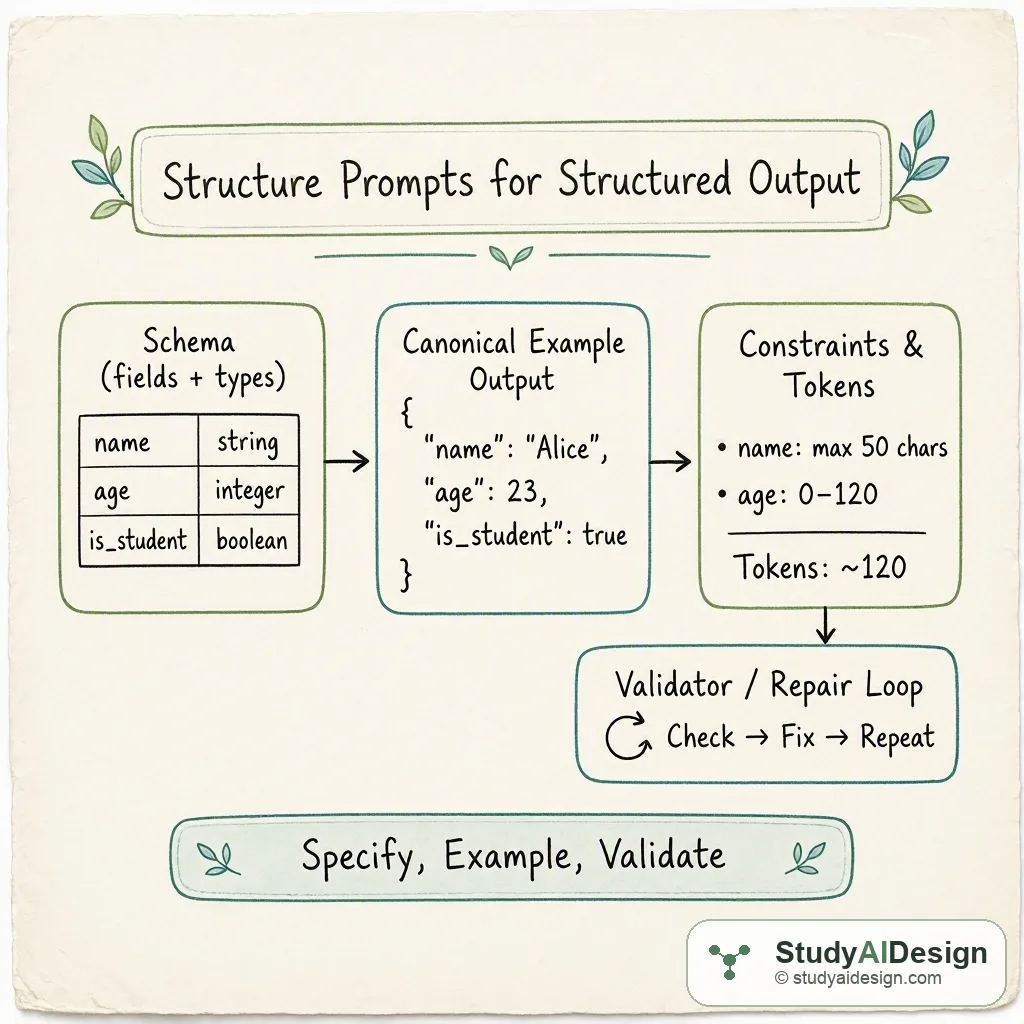
TL;DR
- Specify an exact schema with field names, types, and required versus optional fields.
- Provide a single canonical example and one or two edge-case examples that match the schema exactly.
- Force machine-readable delimiters and finishing tokens, then run an automatic validator and repair loop. Key tradeoffs: strict formatting increases reliability but reduces natural-language flexibility and may need extra tokens for examples.
In this question, we will learn how to structure prompts to get consistent structured output such as JSON or XML. The focus is on practical patterns you can use in an interview or real project to reduce parsing errors and increase repeatability.
We will cover the following:
- Prompt framing and required schema
- Canonical and edge-case examples
- Enforcing delimiters and termination tokens
- Validator and repair loops
Answer: Start by specifying a precise schema and required fields, show a canonical example that matches the schema exactly, constrain the output with explicit delimiters and closing tokens, and include an automated validation and repair step to catch and fix remaining problems. This combination gives predictable machine-readable output while keeping prompts readable for a human reviewer.
The intuition (an analogy that makes it click)
Think of the model like a person filling out an online form. If you hand them a blank form with clear labels and an example showing how to fill each box, they will follow it. If you also tell them where the form begins and ends and check their work after they finish, you will catch mistakes.
A schema is the form layout, an example is the filled sample, and the validator is the person checking for missing or malformed answers.
How it actually works (the real mechanics, with a worked example)
We will build a prompt that asks for a small user profile in JSON. The schema requires three fields: name (string), email (string), and tags (array of lowercase strings). We use one canonical example and a closing token to avoid trailing commentary.
Prompt structure, in order:
- System or instruction: define role and strict output requirement.
- Schema block: exact fields and types, which are required.
- Examples: one canonical JSON output, one edge case (empty tags).
- Output directive: return only the JSON and end with a closing token like
<END>. - Post-processing: validate, and if invalid, ask the model to repair using the validator response.
Example prompt text (conceptual):
- Instruction: "Return only valid JSON that matches the schema below. Do not add any explanation."
- Schema:
- name: string
- email: string
- tags: array of lowercase strings (may be empty)
- Canonical example:
{"name": "Ada Lovelace", "email": "ada@example.com", "tags": ["math", "pioneer"]}
- Output directive: "Now return the JSON for the input below and finish with the token
<END>."
If we compare three prompt patterns the practical differences look like this:
| Prompt pattern | Likely issues | Parse success rate |
|---|---|---|
| Loose instruction without schema | Extra commentary, inconsistent field names | |
| Schema + example, no delimiter | Mostly OK, occasional trailing text | |
| Schema + example + delimiter + validator | Consistent JSON, repair handled automatically |
Implementation detail: use your parser to run a strict JSON parse. If parse fails, send a short repair prompt that includes the original model output and a requirement to output only corrected JSON.
Common patterns and templates
Here are a few patterns you can reuse.
- Schema-first template
- Start with "Schema:" then list each field on its own line with type and allowed values. This reduces synonym mistakes for field names.
- Canonical example template
- Provide exactly one well-formed example. The model will mimic the structure and punctuation.
- Closing-token pattern
- Ask the model to end the response with an unambiguous token such as
<END>or a triple backtick fence. This prevents appended commentary.
- Repair loop
- Validate with a strict parser. If the parser raises an error, send the model: "The previous output failed JSON parse because
<reason>. Please return only corrected JSON." Limit the repair prompt to one round to avoid loops.
Step-by-step recipe you can follow in an interview
- State the role and strict requirement: "You are a JSON generator. Output only JSON."
- Give the schema and mark required fields.
- Provide one canonical example and optionally one edge case.
- Add a clear termination token: "Finish with
<END>". - Validate output in code and, on failure, send a short repair prompt that includes the raw output and the parse error.
This procedure makes answers repeatable and easy to score during an interview.
Tradeoffs and failure modes
Using strict schemas and examples increases reliability but can make prompts longer and less flexible when you need free text. The model may still hallucinate field values or omit optional fields. Validators add latency because you parse and possibly re-query the model.
Questions the interviewer might ask
Some follow-up questions you might get:
Why include a canonical example? The model tends to mimic formatting. A canonical example shows exact field order, punctuation, and array formatting which increases parse success.
How many examples should you give? Use one canonical example and one edge case if needed. Too many examples consumes tokens and can confuse the primary task. In few-shot terms we often use or .
What validators do you recommend? Use strict parsers for the target format. For JSON use a strict JSON parser and then schema validators like JSON Schema or Cerberus. For XML use an XML parser with an XSD if available.
How do you handle optional versus required fields? Make required fields explicit. For optional fields show the empty form in the example or include a rule like "If no value, return an empty string or an empty array."
Can you force types like integer or boolean? Yes. State types clearly and show examples. If you need strict typing, validate after generation and repair mismatches in a focused follow-up prompt.
How do you reduce hallucinated values? Limit the model to copyable or derivable values from the prompt. If values must be invented, mark them as placeholders and validate format only.
Some things to note:
- Always run an automated parse and reject nonconforming outputs.
- Use minimal natural language after the schema so the model does not add prose.
What the interviewer is really testing
They want to see you combine prompt design, examples, and programmatic validation to produce reliable machine-readable output. They also check for awareness of failure modes like trailing commentary and schema ambiguity and for a pragmatic fix loop that catches and repairs errors.
Further reading in the curriculum
Go deeper on the fundamentals behind this question.
- Prompting and Context Engineering How to structure prompts and fill the context window so models produce reliable, grounded, and cost-efficient outputs.
Related questions
How would you rate the quality of this article?
Prepare for your AI engineering interview
This is one of many detailed questions and explainers on StudyAIDesign. Browse the full set, work through the curriculum, and walk into your interview ready.