What is embedding dimensionality, and how does it affect performance and cost?
Embedding dimensionality for vector-db affects similarity quality, search speed, and storage cost. This page explains what embedding dimensionality is, how it changes accuracy and compute, and practical rules for choosing $d$ in vector databases.
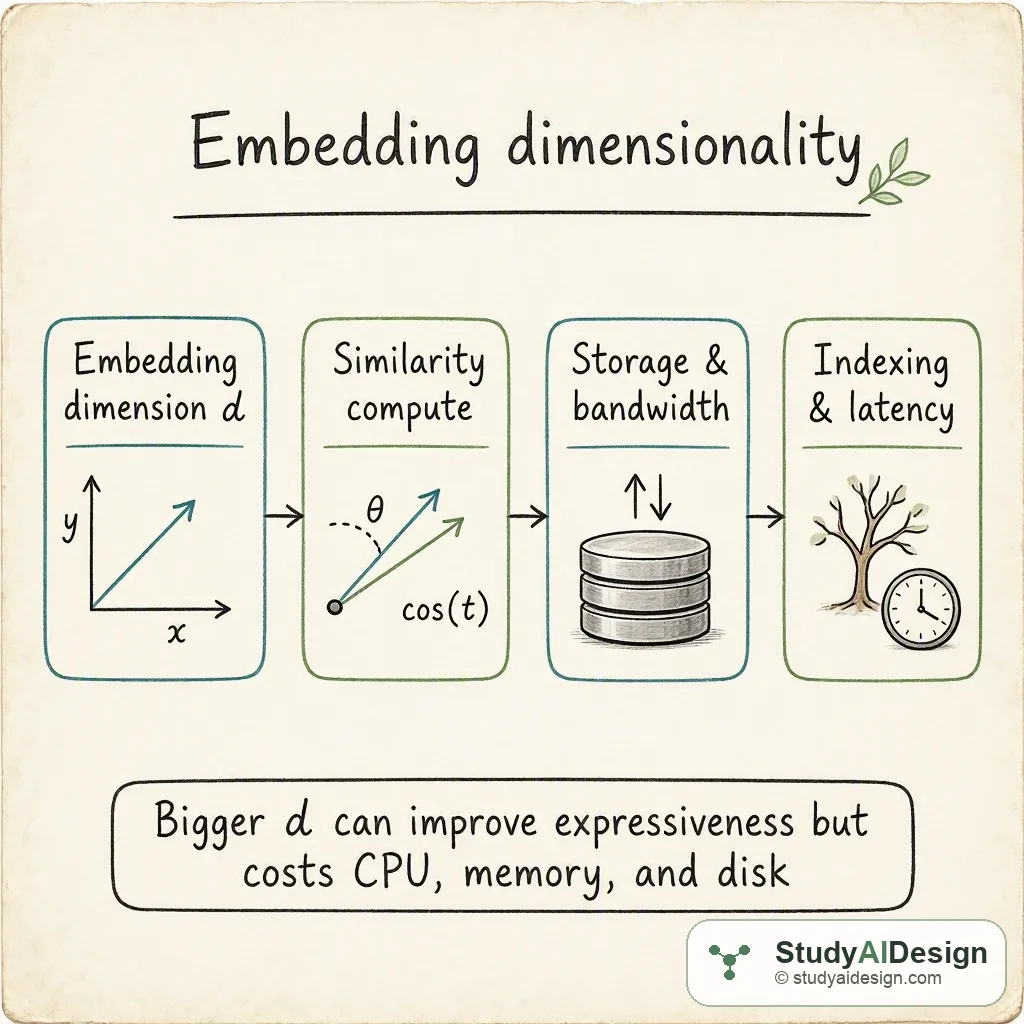
TL;DR
- Embedding dimensionality is the number of coordinates in each vector, commonly written as .
- Increasing often raises representational quality but also raises compute for similarity, memory for storage, and index complexity.
- Similarity operations cost scale roughly with and storage cost scales linearly with per vector.
- Pick by testing downstream accuracy and by measuring cost impact on storage and query latency. Key tradeoffs: accuracy versus compute and storage costs.
In this question, we will learn what embedding dimensionality is in the context of vector-db systems and how changing affects retrieval performance and operational cost. We will keep the discussion practical so you can reason about choices during an interview or an architecture review.
We will cover the following:
- The intuition (an analogy that makes it click)
- How it actually works (mechanics with a worked example)
- Choosing dimensionality in practice
- Efficiency techniques
- Tradeoffs and failure modes
- Questions the interviewer might ask
- What the interviewer is really testing
Direct answer: Embedding dimensionality is the number of components in each vector, called , and it directly affects expressiveness, compute cost, and storage cost. Higher can improve accuracy up to a point but increases similarity compute time, memory per vector, and index complexity, so choose by balancing marginal accuracy gains against these costs through empirical tests.
The intuition (an analogy that makes it click)
Think of each embedding as a coordinate on a map. If the map has only two axes, similar items can be close but many different distinctions collapse. Adding more axes gives you room to separate items that looked close before, like adding new streets and alleys to a city map.
But every extra axis also means more paper and more time to read coordinates. More axes give clarity, but they make storage heavier and comparisons slower. The art is finding just enough axes to separate the things you care about.
How it actually works (the real mechanics, with one concrete worked example)
An embedding model outputs a vector of dimension . Similarity search typically computes cosine similarity or dot product between two vectors. A single vector comparison requires roughly operations because each of the coordinates participates in the dot product.
Storage per vector depends on numeric precision. With bytes per coordinate, a single vector requires bytes. For example with float32 where , storage per vector is bytes.
The total memory to hold vectors in plain form is:
Worked example: compare three options for vectors and float32 coordinates ().
| dimensionality | bytes per vector | total memory for 1M vectors |
|---|---|---|
| 64 | 256 MB | |
| 128 | 512 MB | |
| 512 | 2 GB |
Similarity cost per query also scales. If a brute force search computes dot products with all vectors, cost is . If we use an approximate nearest neighbor index, search cost drops but the per-candidate comparison still depends on .
Key numeric relationships you can cite in an interview:
- Similarity compute per pair: .
- Brute force query cost: .
- Memory linear in and as shown above.
Choosing dimensionality in practice
Start with the embedding model default. Many off-the-shelf models use in the range 64 to 1536. If you control the model, try these steps:
- Evaluate retrieval quality or a downstream metric as a function of . Use held-out queries and measure recall or MAP.
- Track cost metrics: storage, memory pressure, query CPU, and latency percentiles. Compute marginal gain in accuracy per percent increase in cost.
- Prefer the smallest that reaches acceptable accuracy. If larger gives only tiny gains at large cost, prefer the smaller one.
Practical heuristics:
- For dense text embeddings used for semantic search, of 256 to 768 is common.
- For compact use cases or edge devices, 64 to 128 is often enough.
- For very fine-grained semantic tasks, try 1024 or higher but measure carefully.
Efficiency techniques
- Quantize vectors to lower-precision formats such as float16, int8, or product quantization. That reduces and thus memory, but you introduce quantization error. Test the accuracy impact.
- Use approximate nearest neighbor indexes so you avoid brute force. Index recall can depend on because higher-dimensional spaces can be harder for tree or hash based methods.
- Dimensionality reduction: if you have a high , try PCA or learned projection to reduce to a smaller that preserves most variance for your task.
Compare tradeoffs for a simple quantization example:
| technique | memory per vector | typical effect on accuracy |
|---|---|---|
| float32 | bytes | baseline accuracy |
| float16 | bytes | small drop, often acceptable |
| int8 PQ | approx bytes | moderate drop, large memory savings |
Tradeoffs and failure modes
Larger increases expressiveness but can worsen some failure modes. High-dimensional spaces can become sparse in a way that makes nearest neighbor methods less reliable, a phenomenon related to the curse of dimensionality. Also, model embeddings with redundant dimensions waste compute and storage.
Questions the interviewer might ask
Some follow-up questions you might get:
How does dimensionality affect index choices? Higher often reduces the effectiveness of tree-based indexes and increases the number of probes or shards required for ANN methods. LSH and PQ methods can help but need tuning.
What precision should we store embeddings in? Use float32 for training outputs and float16 or quantized formats for serving if accuracy remains acceptable. Test on your metric to decide.
How do you measure whether increasing helps? Run A/B tests or offline evaluation: measure recall or downstream task metrics while tracking compute, memory, and latency changes.
Is there a rule of thumb for per data size or per task? No fixed rule covers all cases. Text semantic search often prefers 256 to 768. Very small tasks or mobile deployments can use 64 to 128.
Can we reduce dimensionality without losing accuracy? Yes. PCA or a learned linear projection sometimes compresses vectors with small accuracy loss. Experimentally validate.
Some things to note:
- Always measure tail latency, not just mean latency.
- Report memory and network bandwidth when quoting embedding sizes.
- Quantization reduces storage but adds approximation error.
What the interviewer is really testing
They want to see that you understand the concrete relationships between , compute complexity, and storage, and that you can reason about practical tradeoffs. They also want to hear about measurement, experiments, and mitigation techniques such as quantization, ANN, and dimensionality reduction. Give concise formulas, a worked example, and a plan to test in production.
Related questions
How would you rate the quality of this article?
Prepare for your AI engineering interview
This is one of many detailed questions and explainers on StudyAIDesign. Browse the full set, work through the curriculum, and walk into your interview ready.