What is Model Context Protocol (MCP), and how does it standardize tool integration?
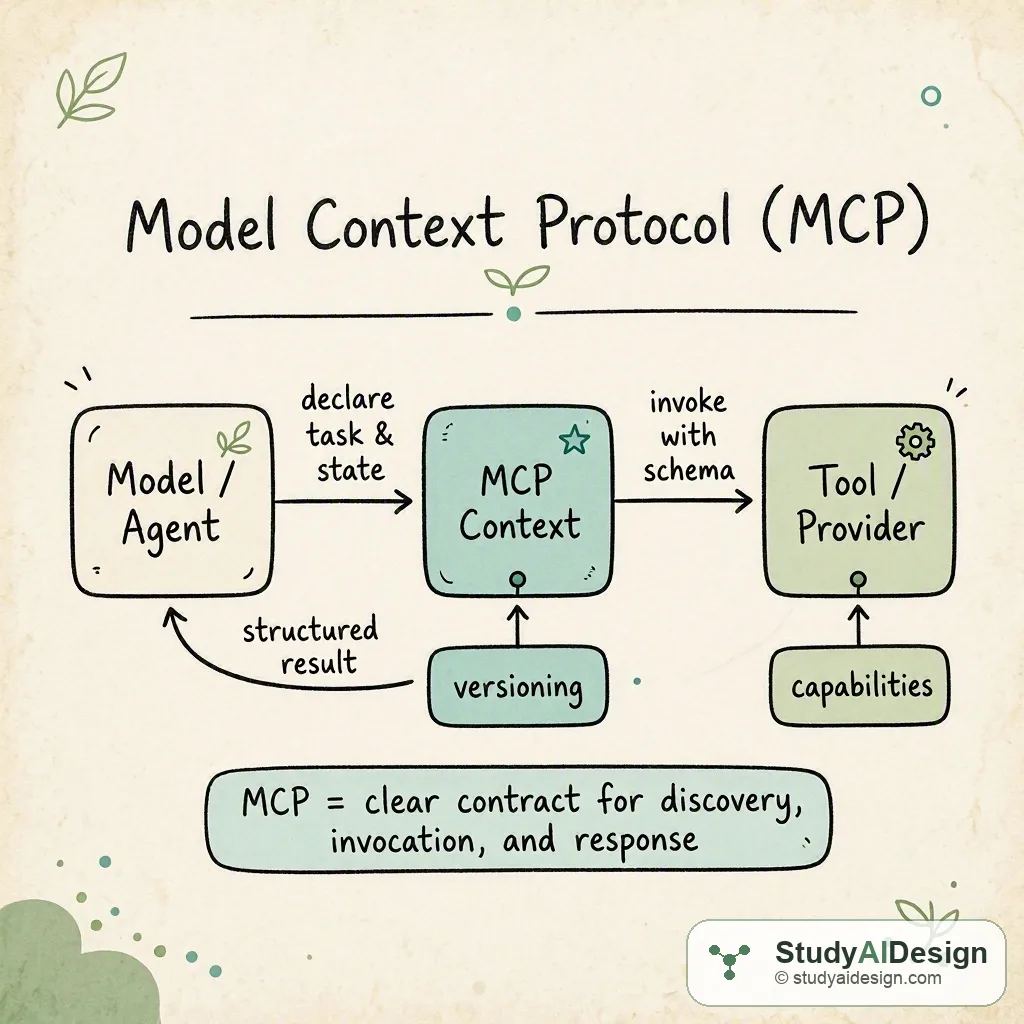
Model Context Protocol (MCP) defines a standardized contract for model, agent, and tool interactions so tools can be discovered, invoked, and returned results in a predictable way. It explains how to package context, declare capabilities, and handle responses so tool integration is reusable across agents and models.
TL;DR
- Model Context Protocol (MCP) is a simple contract that lets models, agents, and external tools exchange structured context and results.
- MCP standardizes how capabilities are declared, how inputs are typed, and how responses are returned so tools are interoperable across agents.
- Using MCP reduces brittle prompt engineering and makes tool invocation deterministic and auditable. Key tradeoffs: easier integration and observability versus the cost of defining and maintaining schemas and adapters.
In this question, we will learn what the Model Context Protocol is and how it standardizes tool integration for agents and models. We will explain the concepts, show a clear worked example, and highlight common tradeoffs and interviewer follow ups.
We will cover the following:
- The intuition
- How it actually works
- Defining schemas and discovery
- Tradeoffs and failure modes
- Questions the interviewer might ask
Direct answer: Model Context Protocol is a standardized contract that describes how models, agents, and external tools exchange typed context, declare capabilities, and return structured outputs, so tools can be discovered and invoked reliably across different agent implementations. It standardizes input and output schemas, versioning, and a small set of runtime behaviors so integrations become reusable, observable, and less dependent on fragile natural language prompts.
The intuition (an analogy that makes it click)
Think of MCP as a marketplace form for hiring a specialist. Without a form you would call different vendors, describe the task in many ways, and parse varied results. With MCP you fill a single structured request: who you are, what you need, and how you want the response formatted. Each specialist advertises exactly what they can do and the shape of their answer. That makes hiring repeatable.
This is what MCP does for models and tools. The model or agent fills a request using the protocol, a tool advertises its capabilities and expected inputs, and the tool returns a structured response that the agent can reliably consume.
How it actually works (the real mechanics)
At a high level MCP has three pieces: discovery, invocation, and response. Discovery lets an agent know what tools exist and what schemas they expect. Invocation passes a typed context and input. Response returns structured data and optional provenance.
Concrete worked example: a model needs a calculator tool to compute and track the calculation provenance.
- Tool declares a capability in MCP: name "calculator", input schema has a field "expression" type string, and output schema has fields "result" type number and "steps" type array of strings. The tool also exposes a version tag.
- Agent discovers the tool via MCP capability discovery and validates the schema. The agent constructs an MCP request context that includes agent id, task id, and the typed input: expression = "".
- The tool receives the MCP invoke call, evaluates the expression, and returns
{ "result": 4, "steps": ["parsed 2+2", "computed 4"] }matching the output schema. - The agent consumes the structured result and can continue reasoning or present the answer with provenance.
Compare integration approaches:
| Aspect | Ad hoc prompt | MCP-based | Proprietary SDK |
|---|---|---|---|
| Discovery | No standard | Standard capability list | SDK-specific registry |
| Input typing | Natural language | Strong schema | Varies |
| Response parsing | Fragile | Structured JSON | Varies |
| Versioning | Hard | Built in | SDK dependent |
In MCP we often think in small counts: discovery involves capability check, invocation is typed message, and the response is validated object. That simplicity reduces the number of failure points.
Defining schemas and discovery
Schemas are the heart of MCP. A schema describes expected fields, types, optionality, and minimal validation rules. Good schemas are concise and follow these guidelines:
- Keep inputs minimal, required fields only when necessary.
- Use typed primitives: string, number, boolean, array, object references.
- Include enumerations for known choices to avoid ambiguity.
Discovery is usually a registry or a call that returns a list of capabilities and their versions. Agents should cache capabilities but validate version and schema hash at invoke time to avoid silent mismatches.
When to use MCP and how to adapt existing tools
MCP is best when you have multiple agents or tools that must interoperate, or when you need observability and reproducibility. If you already have a single tightly coupled SDK, converting to MCP gives portability but requires writing adapters that map SDK calls to the MCP shape. A lightweight adapter usually needs to implement three functions: advertise, validate, and invoke.
Adapter example responsibilities:
- advertise: return capability metadata and schema
- validate: check the incoming request conforms to schema
- invoke: map fields to the underlying tool call and produce a structured response
Tradeoffs and failure modes
MCP brings predictability at the cost of upfront design work. You must define schemas, maintain versions, and write adapters for legacy tools. These costs are often worth it for teams building many agents or many tools.
Questions the interviewer might ask
Some follow-up questions you might get:
How does MCP differ from OpenAPI? OpenAPI is targeted at REST APIs with request and response schemas and HTTP semantics. MCP is focused on runtime model-tool interactions, capability discovery, and tool invocation patterns tailored for agents, including provenance and lightweight invocation semantics.
How do you handle streaming responses or long-running tasks? MCP can support streaming by specifying an evented response schema or a separate status resource. Version your capability to indicate streaming behavior and include checkpoints or incremental partial results in the schema.
How do you manage schema evolution? Use semantic versioning for capabilities, keep backward compatible additions optional, and require agents to check capability versions before invoking. Provide migration adapters when breaking changes are unavoidable.
What about security and untrusted tools? Treat tools as untrusted by default: validate all outputs against schemas, sandbox tool execution, and restrict what the tool can access. Include provenance fields so you can audit tool outputs.
Can MCP be used with black box models? Yes. MCP is a protocol between the agent layer and tools. The model can remain a black box as long as the agent can format invoke requests and consume structured results.
Some things to note:
- Enforce runtime validation to catch schema drift early.
- Keep schemas focused on machine-friendly fields rather than verbose natural language.
- Provide clear versioning and migration paths for capabilities.
What the interviewer is really testing
They want to know that you understand the practical need for a protocol that makes tool integration predictable and testable, not just an abstract standard. They also want to see you can explain core components: capability discovery, typed invocation, versioning, and validation, and that you can reason about tradeoffs like upfront schema work versus long term interoperability.
Further reading in the curriculum
Go deeper on the fundamentals behind this question.
- Agent Fundamentals From single LLM calls to autonomous agents: planning, tool use, memory, and the control loop.
- AI Design Patterns A catalog of recurring architectural patterns for LLM systems, with tradeoffs, failure modes, and guidance on when to combine or avoid each.
Related questions
How would you rate the quality of this article?
Prepare for your AI engineering interview
This is one of many detailed questions and explainers on StudyAIDesign. Browse the full set, work through the curriculum, and walk into your interview ready.