How does Prompt Caching work?
How does Prompt Caching work? Learn how prompt caching reduces repeated LLM calls by reusing prior outputs for identical or equivalent prompts, and what tradeoffs to manage around freshness, keying, and privacy. This covers practical strategies, a worked example, and common failure modes.
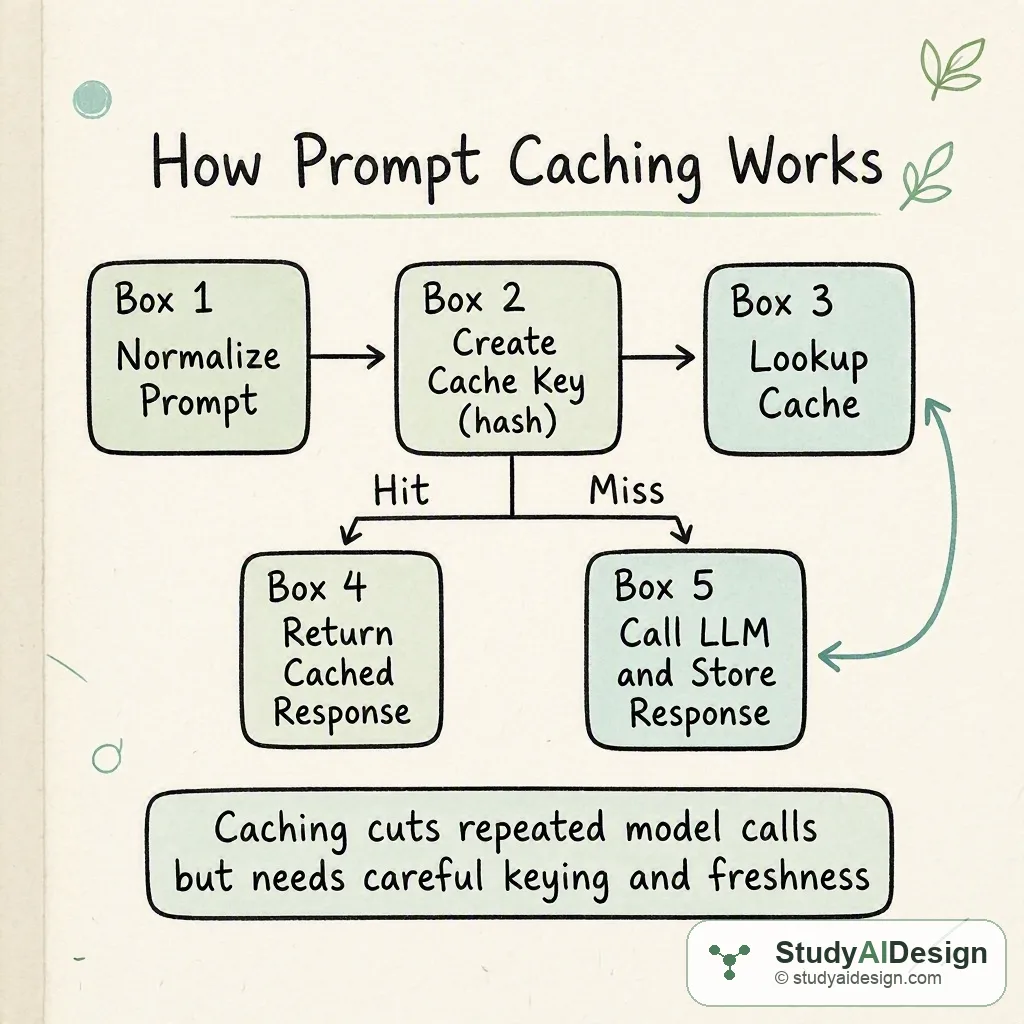
TL;DR
- Prompt caching stores and reuses model outputs for identical or equivalent prompts to cut latency and cost.
- Keying and normalization decide whether two prompts are the same; misses still require a model call and storage.
- Effective caching needs TTL, eviction policy, and privacy controls to avoid stale or unsafe responses. Key tradeoffs: cache hit rate versus freshness and privacy.
In this question, we will learn how prompt caching works and why it matters for LLM inference. We will walk through the intuition, the mechanics, a concrete worked example, and practical strategies you can propose in an interview.
We will cover the following:
- The intuition
- How it actually works
- Cache strategies and eviction policies
- When to apply prompt caching
- Tradeoffs and failure modes
- Questions the interviewer might ask
- What the interviewer is really testing
Direct answer: Prompt caching works by mapping a normalized prompt to a cache key, checking for a stored response, and returning that response on a cache hit; on a miss you call the model and then store the result. It reduces model calls, lowering latency and cost when prompts repeat, but requires careful keying, TTLs, and privacy controls to avoid incorrect or stale responses.
The intuition (an analogy that makes it click)
Think of a busy coffee shop where every customer asks for the same drink. If the barista pre-prepares the common orders, waiting customers get served instantly. Prompt caching is the same idea: if many requests ask the same prompt, we can return the prepared answer instead of re-running the whole model each time.
That analogy highlights three things: recognizing repeat requests, storing prepared answers, and deciding when a prepared answer goes stale or must be discarded.
How it actually works (the real mechanics, with one concrete worked example)
At a high level the steps are:
- Normalize the incoming prompt to a canonical form. This can include removing benign whitespace, applying the same system messages, and substituting variables you treat as irrelevant.
- Create a cache key, usually a stable hash of the normalized prompt plus relevant context and version metadata.
- Lookup the key in a fast store. If present and fresh, return the cached response. If not present or expired, call the LLM, store the response with metadata, and return it.
Key math and measures use a hit rate , request rate , and cost per model call . The number of model calls per unit time is . The cost with caching is thus:
So direct savings compared to no caching are:
Worked example. Suppose requests per hour, c=\0.02h=0.6$ by normalizing prompts.
| Metric | No cache | With cache () |
|---|---|---|
| Model calls per hour | 10,000 | 4,000 |
| Cost per hour | $200.00 | $80.00 |
| Cost savings per hour | $0.00 | $120.00 |
This table shows how even a modest hit rate produces large cost and latency improvements when is large.
Practical details to include when you implement this in a system design answer:
- Include model and prompt version in the cache key to avoid returning responses generated by an incompatible model or prompt template version.
- Store metadata: timestamp, input hash, model version, and origin to support TTLs and audits.
- Normalize only the parts that do not change output meaning. Over-normalizing can incorrectly increase hit rate at the cost of correctness.
Cache strategies and eviction policies
There are common strategies depending on workload patterns:
- Exact-match cache: Key is hash of entire normalized prompt and fixed system context. This is simplest and safest when prompts are identical.
- Parameterized or template-aware cache: Remove user-specific nonsemantic fields and include only semantic template parts in the key to increase hits.
- Partial or shard caching: Cache intermediate outputs, like embeddings or decoder prefixes, when the model supports incremental reuse.
Eviction policies:
- TTL: Simple expiry after seconds ensures freshness for time-sensitive data.
- LRU or LFU: Good when working set size is limited and access patterns are skewed.
- Size-based eviction: Cap total bytes to control memory.
Combine strategies. For example, use exact-match with short TTL for public prompts and longer TTL for static template responses.
When to apply prompt caching
Prompt caching is most useful when you see repeatable prompts at scale. Typical cases:
- System messages and templates used for many users in the same form.
- Frequently asked questions or standard document summarizations.
- Deterministic transforms where randomness or latest data do not change the correct answer.
Avoid caching when:
- Prompts request time-sensitive facts or personalized data that must be fresh.
- Prompts include non-deterministic seeds intended to vary outputs.
Tradeoffs and failure modes
Other failure modes:
- Over-normalization can cause false positives and produce incorrect outputs.
- Under-normalization lowers hit rate and reduces benefit.
- Caching sensitive prompts without encryption or access control leaks data.
Mitigations: include model and prompt version in the key, use short TTLs for risky categories, audit cache hits, and encrypt or redact sensitive fields before caching.
Questions the interviewer might ask
Some follow-up questions you might get:
How do you build a cache key that avoids collisions? Use a strong hash like SHA-256 over the normalized prompt plus a JSON-stable serialization of context, model version, and template version. Store the full prompt or a checksum for auditability.
When should you invalidate or evict cache entries proactively? Invalidate when underlying templates change, models are upgraded, or business rules change. Use version tags for bulk invalidation and TTLs for time-sensitive data.
Can prompt caching change model correctness? Yes. If a cached response was generated under different assumptions or stale external facts, returning it can be incorrect. Keep cache metadata and conservative TTLs for correctness-sensitive workloads.
How do you handle personalized content? Either avoid caching personalized fields, remove or redact them before hashing, or include user consent and strong access controls. Consider per-user caches when personalization is stable and repeated.
What storage should you use for the cache? Use low-latency stores like Redis for hot lookups. Back longer-lived entries to a durable store. Consider in-process caches for microsecond latency where safety is less critical.
Some things to note:
- Measure actual hit rate and the latency distribution before and after to prove the impact.
- Version your cache keys whenever prompt templates or model behavior change.
What the interviewer is really testing
They want to see you balance correctness, cost, and latency. Show that you can design a keying and invalidation scheme, reason about hit rate and costs quantitatively, and identify privacy and freshness risks. They also want to see engineering tradeoffs: where caching helps, where it harms, and how to operationalize monitoring and safety.
Related questions
How would you rate the quality of this article?
Prepare for your AI engineering interview
This is one of many detailed questions and explainers on StudyAIDesign. Browse the full set, work through the curriculum, and walk into your interview ready.